
What makes a legal move?
A jump crosses one occupied neighbouring spot and lands in an empty spot directly beyond it. The piece you jumped over disappears. Each successful move therefore reduces the number of pieces by one.
Select a piece first. Valid landing spots gain an outline; selecting a landing spot performs the jump. An empty spot that is not offered as a landing cannot receive that piece. In the opening tutorial, follow the gently glowing piece before trying other moves.
Think about the next jump before taking the current one. A piece left alone at an edge can become difficult to reach. The aim is to finish with one piece, rather than simply to make any available jump.
The first puzzle, in three moves.
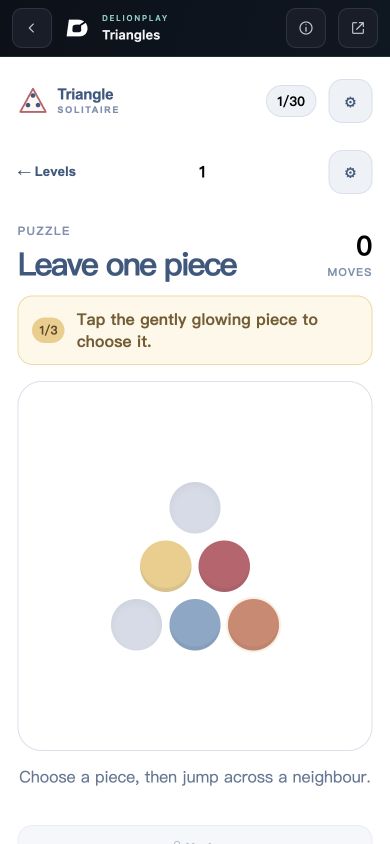
The first board has six positions. Read them from the top: one position in the first row, two in the middle, and three at the bottom. It starts with four pieces and two empty spots. Try the tutorial first, or open the solution below.
Show the first-level solution
- Select the bottom-right piece. Jump it over the middle-right piece into the empty top spot.
- Select that piece at the top. Jump it over the middle-left piece into the empty bottom-left spot.
- Select the bottom-left piece. Jump across the bottom-middle piece into the empty bottom-right spot.
The result screen reads “Beautifully solved.” with three jumps and one piece remaining. Level 2 becomes available. This walkthrough applies to the opening board shown in our capture.
A wrong turn is part of the puzzle.
Undo reverses the last jump and reduces the move count. Restart returns the current board to its initial arrangement. We checked both actions during the opening puzzle; Restart did not remove its previously earned completion record.
The game also offers “Watch for hint”. That is an optional action: we did not activate it or verify reward delivery. You can solve the first board using the ordinary controls above. Settings exposes English and 简体中文, a sound toggle, and a separate Reset progress action. Reset progress is different from restarting a board: its own warning says it removes completed levels from this device.
Completed levels stay in this browser.
After completing level 1 through the catalog player, we reloaded the same player address. The game still showed 1 / 30 and offered Continue · Level 2. The current public game script stores completed-level records in browser local storage.
That verifies a completion record surviving a reload in that browser context. It does not establish a backup of an unfinished board, recovery after deleting site data, or synchronisation to another device. Keep using the same browser profile and entry link. Opening the original game in a new tab can expose a different storage context; read the saves guide before changing how you play.
What we checked.
On 24 October 2026, we entered the live catalog player, completed the first puzzle in three jumps, used Undo and Restart, reloaded to check the completion record, opened the level picker, and inspected the language and sound settings. We also performed a jump at a 390 × 844 viewport.
These checks used the desktop app’s in-app browser at 1280 × 720 and a simulated 390 × 844 viewport. The narrow view is a layout and input check, not a physical-phone or Safari test. We have not completed all 30 levels, tested cross-device saving, or verified the optional hint flow.
The platform entry is labelled 0.0.1; that is the catalog release identifier, not proof of a particular underlying game build. If your board or title differs from this guide, include the player link and what you see in a game-specific report.
Continue playing.
- Open the catalog player used for this guide
- Help with controls, sound and fullscreen
- Troubleshoot a game that will not start
This guide describes observed play and the current public save implementation. See our editorial approach for how we handle updates and corrections.