
Read the economy before spending.
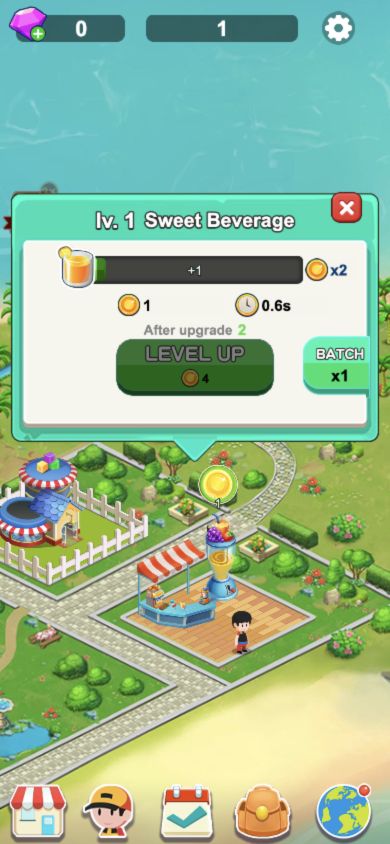
A zero starting balance does not mean you need to buy currency. In our check, the Sweet Beverage stand had an Unlock button and a Buy price of 0. We opened it, then clicked its floating coin to collect one coin. The top balance changed from 0 to 1. The nearby Kika Toys shop cost 65, so it was not the free starting business.
Clicking the opened Sweet Beverage stand showed its level-one panel: output 1, a 0.6-second cycle, and a LEVEL UP price of 4 with output 2 shown after upgrade. At a balance of 1 we had not yet earned the upgrade price. These are the values observed in this opening check, not a fixed price list for every level.
An idle-management game gives you several numbers that can look interchangeable. Available funds describe what you can spend now. An income rate describes how quickly a business produces value. Accumulated earnings describe what has already been earned. The current implementation keeps these as separate values, so a large historical total does not automatically make a purchase affordable.
Start with the business or upgrade the game currently makes available. Open one panel, identify the price and its resource, and compare those with your current balance. If an option is unavailable, look for its stated level, resource or progression requirement before assuming the button has failed.
- Find Sweet Beverage on the starting map and confirm that its displayed opening price is 0.
- Open the shop, then collect its floating coin and watch the top balance change.
- Check the price against spendable funds, rather than a lifetime-earnings total.
- Read what the upgrade changes, then make one purchase at a time.
- Return to the main business view and compare the resulting balance and earning rate.
Make the first upgrade. Check what changed.
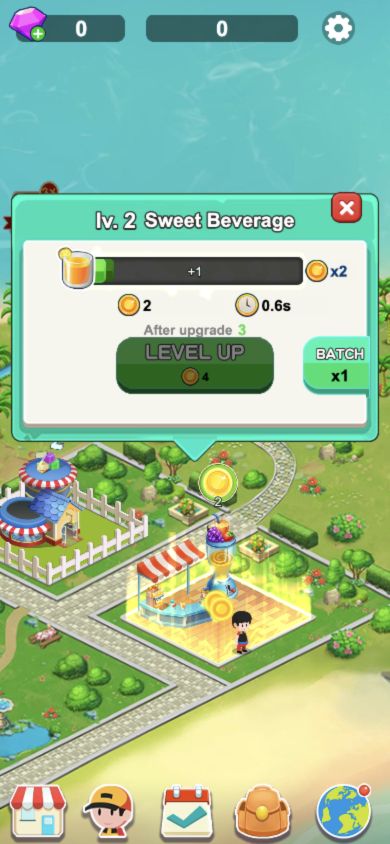
We collected the first shop’s floating coins until the top balance reached 4. With BATCH set to x1, clicking LEVEL UP spent those four coins: the balance became 0 and the panel changed to lv. 2 Sweet Beverage. The output below the progress bar increased from 1 to 2, while the cycle still showed 0.6s.
The change was output per collection cycle, rather than a shorter displayed cycle. In our check, clicking a ready coin increased the top balance; the cycle label was not the spendable balance. Read the coin value, collect it, and compare the balance before deciding that you can afford the next improvement. Later staff and progression systems can change the decisions available.
- Collect ready coins until the top balance covers the displayed upgrade cost.
- Keep BATCH at x1 if you want to inspect one upgrade at a time.
- Compare the new shop level, output and cycle with the previous values.
Compare the next improvement, not just the largest business.
A useful comparison is the extra earning rate an upgrade provides relative to its cost. If one upgrade costs substantially more but adds only a little more income, a cheaper improvement can leave more funds for another useful purchase. This is a decision method, not a promise that one business is always the best investment.
The delivered code distinguishes store levels, staff levels, prestige-related progress and unlock conditions. Those systems do not all spend the same resource or become available at the same time. Read the label on the actual panel instead of treating every plus button as another ordinary cash upgrade.
Make a small change and observe it before buying in a batch. That makes it easier to understand which improvement changed the income rate and which simply moved you closer to a progression requirement.
Give an expansion a purpose.
Staff progression has its own list and upgrade costs in the current implementation. Check which role or business an upgrade affects before committing funds. A staff improvement is useful when it addresses the business you are developing; its presence in a shop panel does not establish that every role is unlocked in a new game.
When the next area becomes available, look at what opening it will leave behind. Spending the entire balance on access can mean waiting before you can improve the new business. Keeping enough funds for an initial upgrade can make expansion easier to understand and use.
Progression and displayed costs can change as the game develops. We do not give a universal buy order or a guaranteed time-to-profit. Base the next purchase on the costs, resource labels and income changes in your own current save.
Keep browser context consistent.
After the first upgrade, we reloaded the same original game address in the same browser profile. Sweet Beverage was still open; reopening its panel showed level 2, output 2 and the unchanged 0.6-second cycle. The top balance remained 0. This is an observed reload result for that specific local state, not a test of every part of a later business.
The delivered code also reads and writes store levels, staff levels and account balances using browser local storage. A local profile is not evidence of a shared DelionPlay cloud-save account. We did not compare the save with the embedded player, another browser or another device, and we did not measure offline income.
Keep using the same browser profile and player entry. Before moving devices or clearing site data, use the separate saves guide and check what the game itself offers. Optional reward buttons and store offers are separate from this ordinary four-coin upgrade; this guide does not verify real-money purchases, advertising rewards or cross-device recovery.
How we checked this guide.
On 25 October 2026 we reviewed the currently delivered business, income, staff and storage code. Using desktop clicks in the original game linked by the catalog at a simulated 390 × 844 viewport, we opened Sweet Beverage at a price of 0, collected coins to a balance of 4 and completed its first upgrade with BATCH x1. We then reloaded that same original entry in the same profile and reopened the level-2 shop. The captures show the actual level-one and level-two panels. A temporary network-wait message during the initial check cleared before the shop interface became available.
We did not complete later expansions, test a physical phone, measure offline earnings, compare save contexts or verify rewards and real-money purchases. Staff and later-upgrade comparisons explain the reviewed systems rather than claiming a completed playthrough.
For the scope of our guides and corrections, read our editorial approach. If your screen behaves differently, send the player link and steps in a game-specific report.